
An IDE for working with an AI partner.
Agentic Developer Kitchen puts your coding-agent sessions, files, documents, notes and a browser in one window per project, and gives an AI partner a view of all of it and a hand in it, behind permissions you set.
Coming soon
How the partner works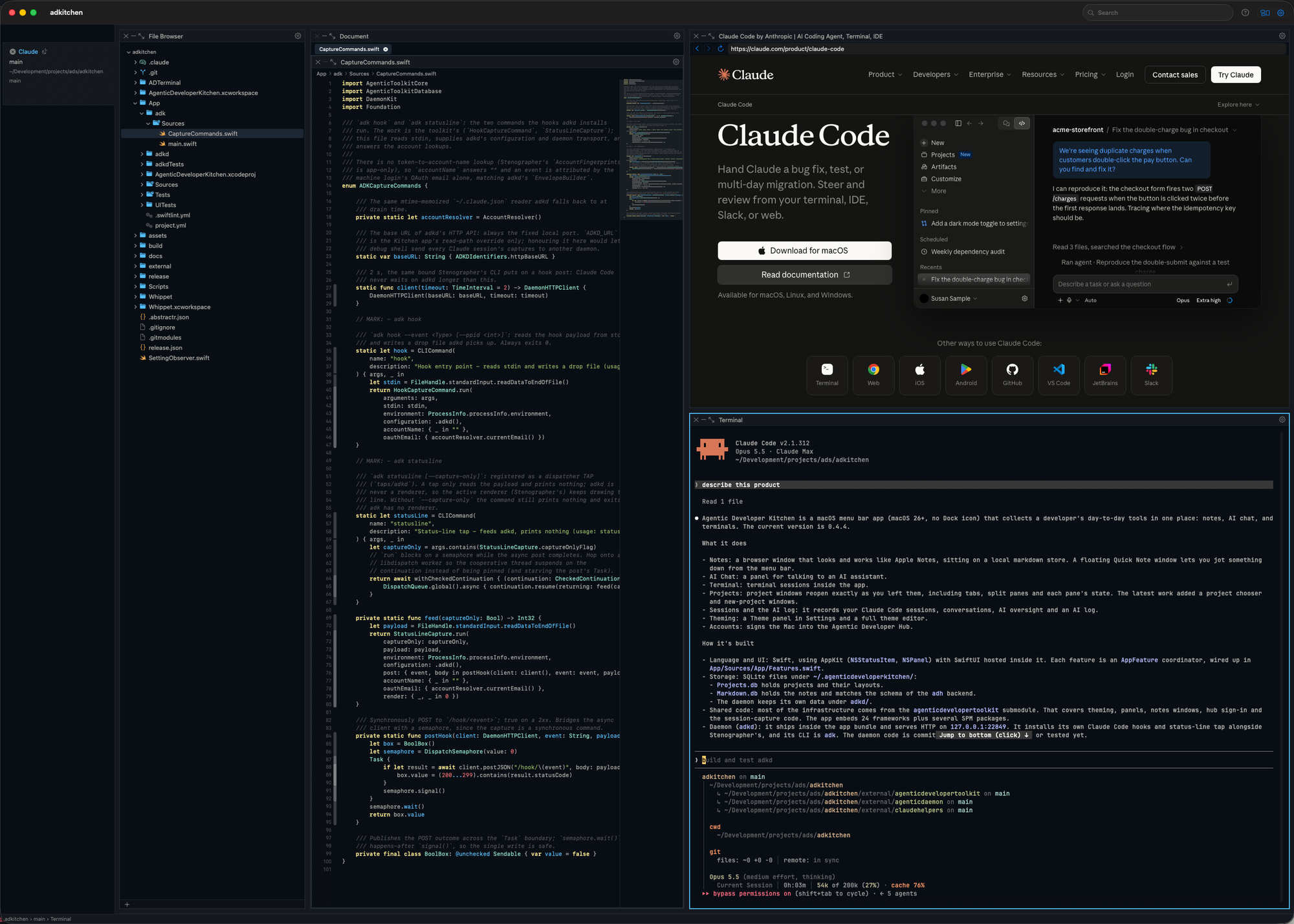
One partner that sees every session.
You run several Claude Code sessions at once, each on a large task. Without help, you rotate through them: read one, answer it, move to the next, and lose your place in each. The Kitchen gives that rotation to a partner.
The partner is a model with a view of every pane in the Kitchen and tools to act in them. It guides an implementing Claude and a reviewing Claude the way you would, with the instructions you would otherwise repeat to each session. When a session needs you, the partner tells you which one and why.
Several sessions, one view of them.
Without a partner
You keep every session in your head.
- Rotate through terminals to see which one stopped
- Type the same guidance into each session
- Shift context every time you check one
With a partner
The partner keeps them, and you see what it does.
- It tells you which session needs your input
- It gives each session the guidance you would give
- Every action it takes happens in the window, where you can see it
- It acts only where your permissions allow
One window per project, reopened as you left it.
A project in the Kitchen is a folder under git and the arrangement you left it in. Each project has its own window of panes that you split, tab, zoom and move, and the window reopens with the same tabs, the same splits and each pane’s state.
Every git worktree of the project has its own tab. The tab is a card that shows the agent working there, its status, the session’s name, the working directory, the branch and a summary of what it is doing.
Everything the work needs, in panes.
Terminals
Claude Code and every other session run in terminal panes, as many as the project needs. A private terminal replaces real names in its output with stand-ins you choose, and a Terminal Chat turns a shell into a conversation.
Files and documents
A file browser over the project, with git status on every file. Files open in tabbed documents, and each tab splits into side-by-side editors.
Notes
Markdown notes in a library shaped like Apple Notes, and a floating Quick Note window for a thought you do not want to stop for.
A browser for you and for models
A web browser in a pane. Models drive it through the Kitchen’s tool server, reading the page as an accessibility tree and acting on its elements, and a badge in the address bar shows when one is acting.
Visual Studio Code extensions
Extensions install from the Open VSX registry and run in the Kitchen, with their commands, views, webviews and language tools.
AI chat
A chat panel with tools drawn from the Kitchen, from Model Context Protocol servers and from extensions.
Every session, on the record.
The Kitchen has its own background service. It records every coding-agent session through the agent’s hooks and transcripts, into a database on your Mac, and the app shows them in Sessions, Conversations, AI Oversight and AI Log windows.
- Sessions
- Grouped by project, each with an AI-written summary
- Conversations
- Every session in one timeline, with a reply box that types into its terminal
- AI Oversight
- Rules that watch live sessions and act on them
The partner works where you let it.
The Kitchen gives models access through its own tool server, on your Mac only, behind a token issued to each install. Settings decide what a model may do: drive a browser pane, run script in a page, act in a session. The Kitchen never edits another tool’s configuration. You register it with a model host yourself, using a command the app gives you to copy.
Every AI feature runs on the model and provider you pick, including local models.
Every feature, by area.
The partner
- A view of every pane in every project window
- Guidance for implementing and reviewing sessions
- Tells you which session needs your input
- Acts only within the permissions you set
Projects
- One window per git project
- Reopens with the same tabs, splits and pane state
- A tab for every worktree, shown as a card
- Panes split, zoom and minimize to any edge
Panes
- Terminals, private terminals and Terminal Chat
- File browser with git status
- Tabbed documents with side-by-side editors
- Notes and Quick Note
- A browser models can drive
- AI chat with tools
Sessions
- Recorded by the Kitchen’s own background service
- Sessions, Conversations, AI Oversight and AI Log windows
- AI summaries of every session
The app
- Visual Studio Code extensions from Open VSX
- Themes, with a full theme editor
- A command palette
- Signed, notarized and self-updating
Say hello.
Questions about the Kitchen, or the work behind it: hello@fishlamp.com.
Part of the Agentic Developer Hub family
Agentic Developer Hub
Agentic Developer Hub is a multi-tenant backend platform for software built with AI agents. One service in front of a PostgreSQL database serves a REST API generated from the schema and an MCP server for agents, and clients reach it through SDKs and a sync daemon. Each product built on it keeps its own users, storage and billing behind a boundary the database enforces. It provides flexible storage, notes, research, community forums, chat between people and personas, and agentic memory and knowledge bases in a vector database, on Apple platforms, Android and Windows, with models from many providers.
The Agentic Developer Team
The Agentic Developer Team is a deterministic multi-agent team harness for reviewing, fixing, planning and building software. Its engine sequences the stages, holds the state of each run and decides when a loop stops, and the models do only the work inside a stage, from prompts kept as data. It reviews a change through specialist lenses, fixes what it finds, and turns a plan into an acceptance contract it builds toward step by step, with models from many providers on Apple platforms, Android and Windows.
Agentic Developer Cookbook
Agentic Developer Cookbook is a library of reference documents that agents read before they write code: principles, guidelines, ingredients, recipes and workflows. Every document is markdown with a stable address and a version, and a compiler turns each one into a skill that any agent host loads only when the work calls for it. Its recipes specify native components for Apple platforms, Android, Windows and the web, and it works with agents on models from many providers.
Agentic Developer Hub SDK
Agentic Developer Hub SDK is an open-source, multi-platform SDK that a developer links into their own app. Each platform has its own packages, for the web, Apple platforms, Android, Windows and the terminal, translated from one set of platform-neutral specs. On each of them it provides the same chat surface and coordinator, which connect an app to Agentic Developer Hub's personas, chat history and model providers, along with the interface, sync, authentication and AI provider components that Agentic Development Studio's own apps are built from.
Agentic Persona Registry
Agentic Persona Registry is a public registry of AI personas, built over the personas their owners create in Agentic Developer Hub. Each persona has a permanent address and a profile with its character, voice, examples, reputation and the model it runs on. A visitor can search for personas by what they offer and talk to one without an account, on the web and on Apple platforms, Android and Windows.
My Agentic Teams
My Agentic Teams is a platform where anyone can build, download and run agent teams, on the same deterministic multi-agent team harness as The Agentic Developer Team. Each team is plain markdown and JSON data, and the shared engine sequences its stages, holds its state and decides when it stops. A team builder turns a conversation into an installable team and improves it against its own tests, and teams for research, projects, travel, events and more run on models from many providers, on Apple platforms, Android and Windows.
BitBag
BitBag is Agentic Developer Hub's AI persona for developers. It is a Hub persona: a prompt, a voice and a character, with memory and a knowledge base. It speaks through an animated avatar drawn by a separate engine. It knows the Hub, the Studio's tools and a curated timeline of what matters in agentic development, and it runs on the web and on Apple platforms, Android and Windows, on whichever model and provider it is given.
Stenographer
Stenographer is a local recorder for AI coding sessions. One background service captures each session's events and transcript into a SQLite database on the developer's machine, and the app, the command line and the status line are clients of it. It shows live sessions, conversations, cost, charts and oversight rules, tracks working time by project for billing, and runs its AI features on models from many providers. For now it runs on macOS only.
Agentic Developer Community
Agentic Developer Community is Agentic Developer Hub's own discussion forum, a board of topic rooms and threads that anyone can read and Hub members can write in. It holds no data of its own: its topics, markdown posts, nested replies, reactions and roles live in the Hub, which mounts the same forum in every workspace, and agents read it through the Hub's MCP server. A thread stays filed in its room and searchable, members have profiles and a people directory, and moderators and admins pin, lock, mark answers and manage rooms and roles. It runs on the web and on Apple platforms, Android and Windows.
Agentic Developer Docs
Agentic Developer Docs is a private library in Agentic Developer Hub for the documents a team's work produces, such as specs, runbooks, contracts and decisions. A document is the same kind of markdown record as a Hub note or research paper, kept on a shelf of its own. Its pages open in every Hub workspace and on the site. A team files documents in nested categories, tags them across categories, keeps every version, stores files of any type beside them, and searches the full text of everything its people and agents wrote. It runs on the web and on Apple platforms, Android and Windows.
Agentic Developer Research
Agentic Developer Research is a place in Agentic Developer Hub where people and their agents write research documents in markdown and publish them as papers. A paper stays private until its author publishes it, which puts it on a public page under their name that search engines index. The same editor runs in every Hub workspace and on the site. Authors file papers in nested categories and tag them, and agents hand over their findings as ordinary markdown through the Hub's MCP server. Anyone can search the published papers without an account. It runs on the web and on Apple platforms, Android and Windows, and works with agents on models from many providers.